
FREE ONLINE IMAGE EDITING
PhotoCraft online image editor
Crop an image, add text or inspect PSD layers in your browser. Follow the tutorials for your first edit or check PSD compatibility before changing a template.
Open free editorFree image editing. No account required. PhotoCraft v0.5.0 · early preview.
Read the beginner guide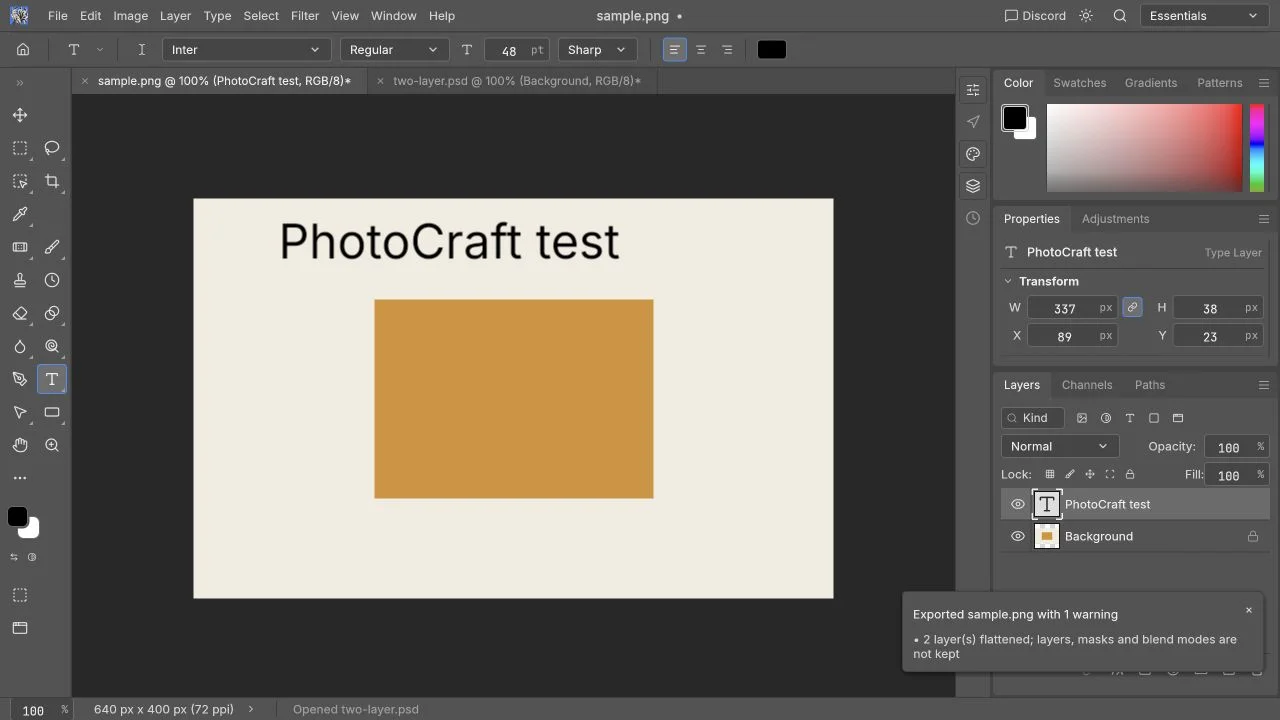
An independent online edition and guide library. We are not the official PhotoCraft project and are not affiliated with Adobe.
What is PhotoCraft Online?
PhotoCraft is an open-source image editor by storytold. You can use its Web edition here without installing an app. This site provides English and Chinese guides; the editor keeps its original interface.
Is PhotoCraft free? Read the introductionWhat would you like to edit?
01Start with an image
Follow the tutorial to open an image, crop it, add text and download a PNG.
02Work with a layered PSD
Find the layer you want to change, check its fonts and compare the saved result with the original.
03Find the right editor
See which everyday edits are worth trying and what to check before using PhotoCraft for client work.
PHOTOSHOP / PHOTOCRAFT
Can PhotoCraft replace Photoshop?
PhotoCraft is useful for quick browser edits, but it is not a full Photoshop replacement for professional delivery. Check complex PSDs, smart objects, print files and large documents with your own files before relying on the result.
Can PhotoCraft replace Photoshop?Read the official PhotoCraft project notesHow to edit your first image
- 01
Open a copy
Launch the editor in an up-to-date desktop browser and choose a small image. Keep the original file.
- 02
Make one change
Crop the image or add a title. Use Undo to reverse a change; the beginner guide shows the tools and menus.
- 03
Download and inspect
Download a new file and open it to check the dimensions and text. PNG exports merge the layers; keep a separate editable file if you need to change them later.
Tutorials and answers
Learn how to edit an image, work with PSD layers, fix loading problems or choose between editors.
Know the product
What is PhotoCraft? Is it free?
The project, the Web edition and this independent site.
What is VectorCraft? Can it replace Illustrator?
Official downloads, installation and SVG, PDF and AI file compatibility.
Which AI features are available?
What is available in the browser and desktop editions.
Is PhotoCraft safe to use?
Where files are processed and how to save them.
Make your first edit
Your first image edit
Open, crop, add text and download a PNG.
How to edit a PSD online
Find a layer, make a change and check the saved file.
Layers and masks explained
Change stacking order and understand masks and opacity.
Keyboard shortcuts
Familiar commands and browser conflicts.
Before you open the editor.
Is the online editor free?
Basic image editing is free and does not require an account. Generative AI features are not available on this site.
Are my images uploaded?
Imported images are processed in your browser; this site has no cloud document storage. Download a new file to save your work. The website still makes ordinary network requests, described in the privacy guide.
Can it replace Photoshop?
Try it for a simple crop or image with text. For complex PSDs, print work or client delivery, keep Photoshop until the files and features you need pass your checks.
Which browser should I use?
Use an up-to-date desktop browser with WebGPU or WebGL2 support. The first launch may take longer while the editor downloads. Start with a small file; mobile editing and large PSD performance have not been verified.
Does it have Chinese menus or Photoshop AI?
The website and guides are available in Chinese; the editor keeps its original interface. Chinese text and fonts have not been tested here. Photoshop-style generative fill and desktop Agent/MCP tools are not available on this site.
Is this the official PhotoCraft website?
No. This is an independently operated host and guide library for the open-source project by storytold. Official code, release downloads and issue tracking are linked directly to that project.
Open an image and start editing
Start with a small image and keep the original. The beginner guide walks through editing and downloading your result.
Open free editor