
PhotoCraft Online Editorial Team
What Is VectorCraft? Free Downloads & Illustrator Comparison
Find official VectorCraft downloads, choose a Windows, Mac or Linux installer, understand SVG, PDF and AI compatibility, and decide when to keep Illustrator.
VectorCraft is a free, open-source vector illustration application from the ArtCraft team. It is designed for paths, shapes, text and artwork such as logos, icons and illustrations. PhotoCraft is the same team's image editor; VectorCraft is the vector drawing tool. Download VectorCraft from its official product page or the storytold/vectorcraft GitHub releases. Official VectorCraft introduction
This guide covers v0.8.0, checked on October 11, 2026. Installation and feature information comes from official release files and documentation, rather than a hands-on desktop review. PhotoCraft Online is an independent guide and PhotoCraft browser editor; get the VectorCraft application from its official publisher.
How are VectorCraft, ArtCraft and PhotoCraft related?
VectorCraft and PhotoCraft are separate applications in the ArtCraft team's Crafting Apps collection. You can install VectorCraft on its own. ArtCraft also names the team's AI image and video studio, so check which application a download or tutorial describes. Official Crafting Apps directory
| What you want to do | Application to explore | Your next step |
|---|---|---|
| Draw a logo, edit curves or make an SVG icon | VectorCraft | Choose an official VectorCraft download below |
| Crop photos, add captions or edit a PSD | PhotoCraft | Read what PhotoCraft does or open the PhotoCraft editor |
| Create AI images or videos | ArtCraft's AI studio | Check that studio's current features and pricing separately |
Vector artwork stores paths and shapes that can remain sharp at different sizes. Photographs contain pixels. Placing a photograph in a vector document does not turn it into editable paths; tracing is a separate operation, and its result needs cleanup.
Is VectorCraft free?
The official application is free and open source, with a choice of MIT or Apache-2.0 licenses. Its download is separate from any paid service in the ArtCraft AI studio. Fonts, stock images and other assets still have their own licenses. VectorCraft licensing
Free access does not establish Illustrator compatibility. Before moving a client project, try a copy, reopen the saved result and confirm that the recipient can use the exported file.
Where should I download VectorCraft?
Start with the official VectorCraft product page. It offers standalone packages and ArtCraft Launcher, which manages installation and updates for the collection. A standalone installer does not require the Launcher.
For a particular version, use VectorCraft v0.8.0 on GitHub. On the date above, GitHub's latest release was v0.8.0 while the product page still linked to v0.7.0. The downloads below point to the verified v0.8.0 release. For a newer version, check latest official releases and read its release notes before upgrading.
Which Windows download do I need?
Open Settings → System → About → System type. Choose x64 for a 64-bit Intel/AMD PC, ARM64 for an ARM-based PC, or x86 for 32-bit Windows. Match the system type rather than the computer's brand.
| Windows system | Installer | Portable ZIP |
|---|---|---|
| 64-bit Intel or AMD | Windows x64 MSI | Windows x64 portable |
| ARM-based PC | Windows ARM64 MSI | Windows ARM64 portable |
| 32-bit Windows | Windows x86 MSI | Windows x86 portable |
Regular installation: download the matching MSI, open it, choose the installation folder and follow the wizard. The v0.8.0 release notes describe folder selection, progress and an option to launch when installation finishes. Then start VectorCraft from its installed shortcut. Official v0.8.0 release notes
Portable copy: extract the entire ZIP into a folder you can write to, then run the VectorCraft application inside it. Keep its accompanying files together. Running directly from the compressed-folder preview can leave required files unavailable. A portable package does not bypass restrictions on a managed work or school computer.
How do I install VectorCraft on Mac or Linux?
| Platform | Package | Installation path |
|---|---|---|
| Apple silicon or Intel Mac | Universal macOS DMG | Open the DMG, copy VectorCraft to Applications, then launch that copy |
| Intel/AMD Linux | x86_64 AppImage | Save it locally, allow execution in file properties, then launch it |
| ARM64 Linux | aarch64 AppImage | Choose the ARM build and allow execution before launching |
| Linux with package management | DEB, RPM or Flatpak in the official release | Match your distribution and processor architecture |
The macOS graphical application is the DMG; the separate vectorcraft-cli archive is for command-line workflows. An AppImage may still need system libraries from your Linux distribution. If it does not start, run it from a terminal to capture the error or try the matching DEB, RPM or Flatpak package. Official package list
How can I check a download or handle an installation warning?
Download SHA256SUMS.txt for v0.8.0 and compare the checksum for the exact filename you downloaded. On Windows, PowerShell's Get-FileHash -Algorithm SHA256 computes the hash; on macOS use shasum -a 256, and on Linux use sha256sum. A match checks agreement with that release's list; it does not guarantee bug-free software.
For a Windows or macOS security warning, first confirm the official source, filename and checksum. If the file is damaged, the publisher is unexpected or your organization blocks installation, resolve that issue rather than disabling protection. For a failed update, keep your documents and use a fresh official package. Keep an earlier installer if you need to return to that version.
Can I use VectorCraft online without installing it?
VectorCraft has a browser build, but the official Web ZIP is a package to host, not a Windows or Mac installer. Its v0.8.0 filename is vectorcraft-web-0.8.0.zip. The documentation describes serving it from a static web server and using a modern browser; opening the ZIP itself does not open a hosted editor. Official Web build instructions
This website hosts PhotoCraft, not VectorCraft. For vector drawing, follow VectorCraft's official page and release options. For photographs or PSD work, use our PhotoCraft browser editor and PSD editing guide. Before opening confidential artwork on another hosted VectorCraft site, check who operates it and how it handles files.
What can I make with VectorCraft?
The official documentation describes drawing and path tools, shape operations, gradients, text, layers and editable effects. A small icon or simple illustration lets you inspect each object and the final export. The screenshot below shows the project's demonstration artwork, rather than a test performed on this website.
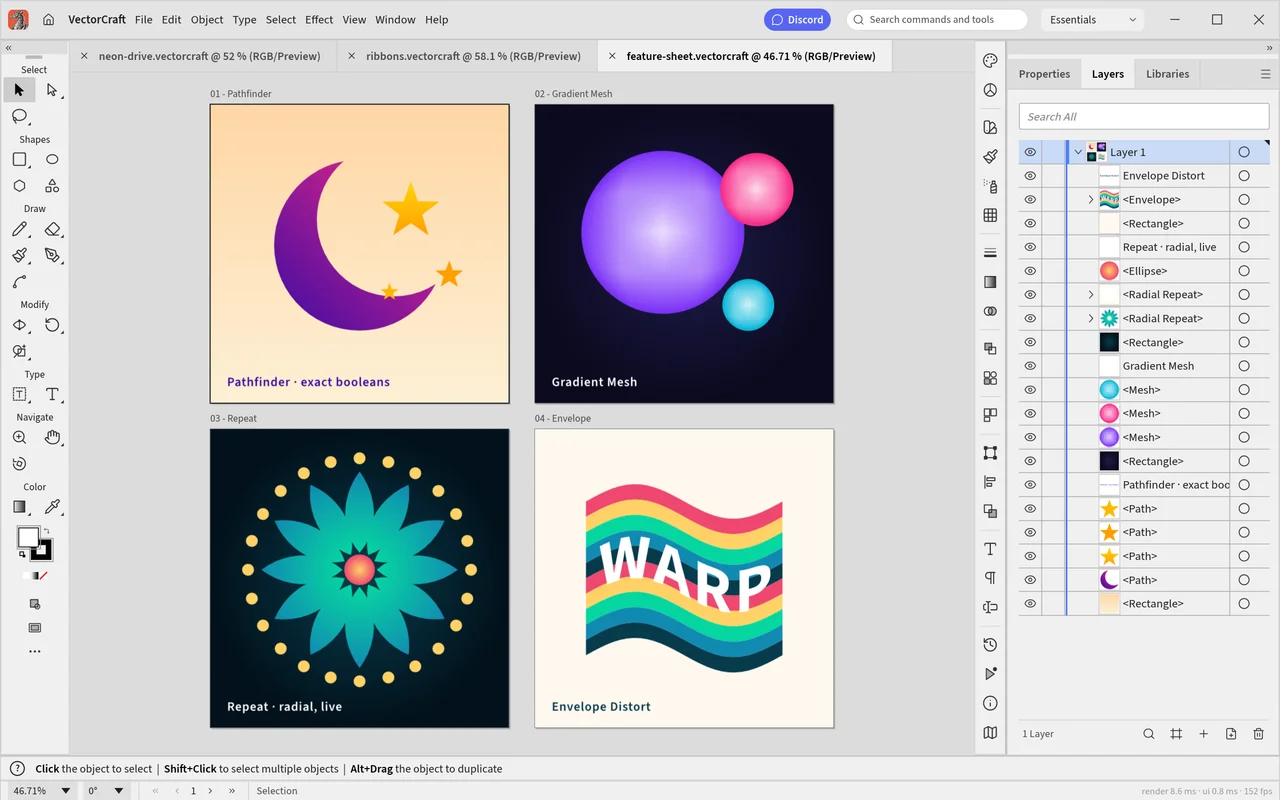
Official screenshot from the v0.8.0 repository, by the VectorCraft contributors. Reproduced under MIT; see image attribution and license and official asset credits.
For a first project:
- Create a small document or open a copy of a simple SVG. Expect a canvas with individually selectable objects.
- Draw a shape and change its fill and stroke. Select it again and check that those properties remain editable.
- Add a short label. Inspect the font, spacing and line breaks at the intended output size.
- Save an editable
.vectorcraftdocument under a new name, then reopen it. Check that paths and text remain editable. - Export SVG for a website or PNG for a fixed-size preview. Open it in another viewer and check dimensions, transparency and appearance before sharing.
Check the export before delivery and keep an editable source alongside it. A PNG contains pixels, not the original paths and text; keep the .vectorcraft document if you will need to change the design later.
Can VectorCraft open SVG, PDF and Illustrator AI files?
The official v0.8.0 documentation describes SVG and PDF import/export and .ai support. Opening a file, matching its appearance and preserving every editable object are different outcomes. Inspect the import notes before making changes. Versioned file compatibility details
| Format | Official v0.8.0 description | What you should check |
|---|---|---|
.vectorcraft | Native editable document format | Save a copy, reopen it and edit the same paths and text |
| SVG | Import/export with paths, text and supported effects | Fonts, clipping, gradients and display in the target browser |
| Import/export; the page and some structure can be recovered | Whether text remains editable and grouping suits your next task | |
Illustrator .ai | PDF-compatible import/export; v0.8.0 adds reading of Illustrator editing data, including some files saved without PDF compatibility | Import warnings, layers, hidden artwork, text and live effects |
| PNG, JPEG or WebP | Image output | Pixel size, supported transparency and appearance; the export is not a vector source |
Illustrator files can contain a PDF-compatible representation and Illustrator-specific editing data. Version 0.8.0 can read some of that editing data and some files saved without PDF compatibility. Complex text, symbols and effects can still change during import, so compare your copy with the original before editing. v0.8.0 import changes
The versioned roadmap explains that some appearances arrive as drawn objects rather than original live effects. Symbols, pattern fills, placed files and some text structures have limits; an import may use the page representation and report omissions. If a client must edit those objects in Illustrator, a matching preview is insufficient. Official AI import limitations
Keep the original .ai, linked images and any PDF preview. Save VectorCraft work under a different filename, then ask the recipient to reopen the delivery copy in their application. Compare artboards, layers, text, clipping and effects before migrating the whole project.
How do I save an AI file for an Illustrator user?
In the v0.8.0 graphical application, use File → Save As and choose .ai. The Export As and Export for Screens dialogs leave AI saving to Save As. Keep PDF compatibility enabled for a file you want another editor to display: the official encoder description says disabling it produces blank PDF pages. Official AI saving behavior
The saved file contains PDF pages and VectorCraft's own document data. That is not proof that Illustrator's original editing structures survive. Ask the recipient to open a sample in Illustrator and try editing its text, groups and effects. If they require the original Illustrator objects, keep using the original Illustrator source until this check succeeds.
Can VectorCraft replace Adobe Illustrator?
VectorCraft is worth trying for simpler vector work, but it is not a blanket replacement for an Illustrator production workflow. Choose by the file you must deliver rather than a familiar toolbar. The project documents remaining gaps in interaction details, advanced type, 3D/materials and automation. Official development status
| Your task | Recommendation | Acceptance check |
|---|---|---|
| Simple website icons and SVG graphics | Try a small VectorCraft project | Inspect the SVG in the target browser and at several sizes |
| Logo sketches and basic illustration | Try it with a separate editable source | Check paths, strokes, text and exports |
| Editing a client's existing AI file | Keep Illustrator available during the trial | Reopen the result there and check structure and appearance |
| Complex live effects, 3D or scripted production | Check the specific capability before switching | Similar menus do not prove equivalent behavior |
| Print delivery or a brand system | Keep your workflow until the recipient approves output | Check fonts, linked assets, spot colors, profiles, bleed and the requested PDF standard |
PDF export and color controls do not prove a file meets a printer's requirements. Ask which profile, bleed and PDF settings they need, then have them check a sample. For collaboration, account for time spent rebuilding effects, replacing fonts and checking files in the recipient's editor.
Common VectorCraft questions
Why does the app not start after downloading?
Check the operating system and architecture first. Extract all files in a portable ZIP. If a fresh official package still fails, capture the exact error, app version and OS version. A blank window can involve graphics support; when you can open the settings, the official documentation describes Preferences → Performance → Graphics Processor. Share the error and a non-sensitive sample through the official issue tracker.
Why do imported text or fonts look different?
The source font may be missing, substituted or represented differently in the imported file. Install a font you are licensed to use, reopen the copy and compare line breaks and spacing. Outlined text can be edited as shapes, but not retyped as normal text. Keep a text-editable source when future wording changes matter.
Can VectorCraft turn a PNG logo into SVG?
The official application includes Image Trace. Tracing creates paths from visible pixels; it does not recover the original font or design construction. Inspect small lettering, thin strokes and edges, and remove unnecessary points. For an important logo, start from the original vector file if available. Official tracing overview
Does VectorCraft include Illustrator's generative AI?
The v0.8.0 roadmap says Adobe cloud services, including Firefly and generative features, are not built in. Agent/MCP control lets external assistants operate the application; that differs from a built-in text-to-image or generative editing service. Check external providers' setup and fees separately. Official service boundaries
Should I choose VectorCraft or PhotoCraft?
Explore VectorCraft for paths, icons and vector illustration. Explore PhotoCraft for photographs and layered image documents. For that workflow, read the PhotoCraft introduction, follow the first-edit tutorial, or compare PhotoCraft with Photoshop.