
PhotoCraft Online Editorial Team
PhotoCraft vs Photoshop: Can It Replace Photoshop?
A task-based comparison of PSD saving, layers, fonts, smart objects, AI, plugins, print workflows and the cost of switching to PhotoCraft.
You can try PhotoCraft v0.5.0 for a crop, a caption or a simple image edit. Keep Photoshop for complex PSDs and professional delivery until your required files and features pass a trial. Before switching, check both the downloaded image and any editable file you need to hand off.
This comparison concerns PhotoCraft v0.5.0 and the browser build offered by this independent website. Sources were checked on October 10, 2026. We have not completed a controlled Photoshop-versus-browser output comparison. If you need the product identity and free/open-source scope first, read What is PhotoCraft?. The PhotoCraft v0.5.0 documentation identifies the project as early alpha and explicitly cautions against treating it as a daily professional replacement.
What counts as replacing Photoshop?
There are three different decisions behind that question. You may need to finish one social image without installing anything, modify a particular PSD template, or move an entire production workflow. Each requires different evidence.
For a flat social image, success means correct size, legible type and a usable download. For a template, success also means preserved layers and text. For production, repeatability, fonts, automation, color and downstream acceptance matter. An editor can meet the first definition while failing the other two, so use the recommendations below as task checks rather than a general score.
Use this short rule before reading the detailed matrix: PhotoCraft can replace Photoshop for a task only after that exact task passes your own acceptance check. It is reasonable to try for crops, captions and some simple raster-layer edits. It is not ready to replace Photoshop as the only tool for client PSD handoff, paid print delivery, Adobe plugin workflows, generative-fill work or any file that must survive another editable Photoshop revision until you have verified that specific workflow.
What do the support labels mean?
| Label | Meaning |
|---|---|
| Officially documented | The pinned upstream documentation describes the capability; this is not our browser test result. |
| Tested on a named sample | A specific operation passed in our recorded local browser session; it does not establish Photoshop equivalence. |
| Documented limitation | The upstream assessment identifies a gap or incomplete workflow. |
| Not verified here | We have not demonstrated this behavior using the hosted browser build and a matching Photoshop reference. |
| Unavailable on this site | This website does not currently provide the capability. |
The menu parity report counts implemented menu commands. A matching menu still needs to produce the right image and save a usable file; the count cannot tell you whether your Photoshop task will work.
The dimensions that matter
| Feature | Current status in PhotoCraft v0.5.0 | What to check before switching |
|---|---|---|
| PSD open/edit/save | Two synthetic pixel layers imported; initial stacking differed; saving and reopening a PSD was not checked | Open the saved copy in the receiving application. |
| Layers, masks and adjustments | Sample layer visibility/reordering and direct pixel brightness tested; masks/adjustment layers untested | Toggle groups, inspect clipping and revise adjustment values. |
| Editable type | New English type layer tested; imported PSD type/CJK untested; typography depth has documented limitations | Change text and check line breaks with your actual fonts. |
| Smart objects and filters | Officially documented; render fidelity has documented limitations | Reopen, replace object content and recheck filters. |
| Shortcuts | Control+Z and Control+Shift+Z passed in one session; broader mappings not tested | Confirm editor focus and browser interception. |
| Generative AI | Unavailable on this site | Use a separately verified tool if generation is essential. |
| Adobe plugins and scripts | Compatibility has documented limitations | Inventory each extension, action and script you depend on. |
| Color and print | Engine capabilities documented; browser-to-print workflow not verified here | Check profiles and printer acceptance end to end. |
| Large files | Upstream support does not establish browser limits | Test your largest representative file and repeated saves. |
| Migration effort | No universal estimate | Include checking exports, fonts, habits and team handoff. |
Feature descriptions come from the pinned README; workflow caveats come from the dated roadmap assessment. Different sections of that assessment refer to different historical baselines, so their counts are not presented as a current browser score.
Separately, our October 10, 2026 local browser session on macOS 26.2, Codex in-app Chromium, 1280 × 720, passed PNG import, new English type, undo/redo, crop, direct brightness and a flattened PNG download. The browser engine version and rendering backend were not identified. The review test record supplies sample dimensions, bytes, steps and screenshots. JPEG, complex PSDs, editable save/reopen and Photoshop output comparisons were not tested.
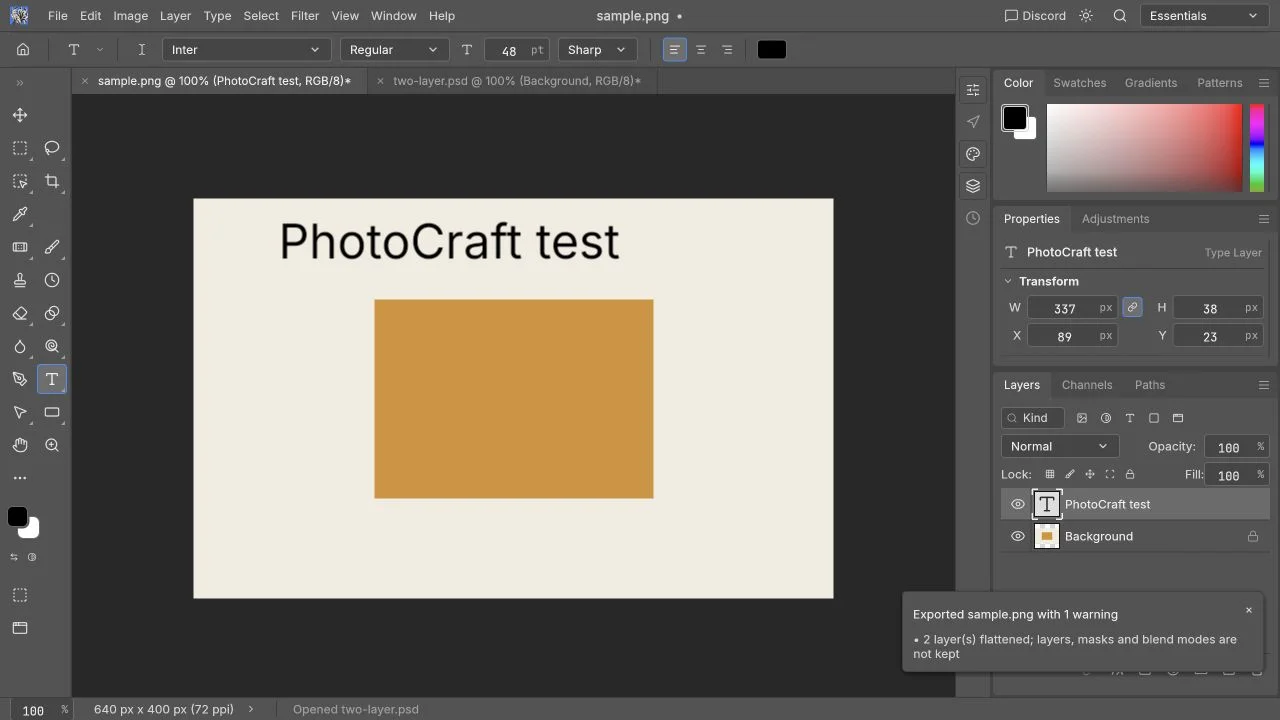
Replacement decision checklist
Choose according to the file you need to deliver:
| Decision | When PhotoCraft can be enough | When to keep Photoshop or another verified tool |
|---|---|---|
| One-off web image | The final PNG/JPEG opens in another viewer with correct dimensions, text and edges | You need the same file to remain layered for another designer |
| PSD template edit | The specific layers you changed still reopen and the unchanged regions match a reference export | Text, masks, smart objects, effects or layer order cannot be verified |
| AI-assisted removal or expansion | A separate verified AI tool produces an acceptable image that you import manually | You need Photoshop Generative Fill parity inside this site |
| Print or paid handoff | The recipient accepts a checked export and no editable Photoshop handoff is required | The job depends on profiles, separations, plugins, actions or editable PSD delivery |
| Team migration | Representative files, shortcuts, fonts and handoff steps pass repeatedly | Only a menu list or a single easy file has been checked |
Does opening a PSD mean it is compatible?
No. Check three separate outcomes: appearance, editability, and whether the saved file still works in the next editor. A flattened preview can look right while its type is no longer editable. A document can contain the same layer names while a smart filter behaves differently. A correct first render says nothing about the document after you save and reopen it.
For a useful trial, choose a template you know well. Record dimensions, byte size, layer count, fonts and essential effects. Save a reference image from the original application. In PhotoCraft, change one text layer and one image, then save under a new name. Reopen the result and compare the unchanged regions as well as the edited ones. Never overwrite the only original.
Our synthetic two-layer PSD exposed an initial stacking mismatch with its embedded composite. Hiding and reordering Background worked, but the cause could be fixture encoding or importer behavior and remains unresolved. Our PSD compatibility guide separates supported file features from tested samples. The online PSD tutorial explains the editing sequence. A flat image export delivers pixels; it does not prove the layered PSD remains reusable.
For a replacement decision, require a saved editable copy to pass three checks: reopen in PhotoCraft, reopen in the receiving Photoshop version, and complete one more ordinary edit there. Passing only the first screen render is a preview check. Passing only a PNG export is a final-image check. Neither proves PSD replacement.
Layers and type: test the next revision
For layers, the decisive question is whether the next requested edit remains possible. Try hiding a group, changing its opacity, revising a mask edge and reopening an adjustment. Inspect shadows and clipped content against both light and dark backgrounds. These checks tell you whether you can revise the design later.
For text, use the exact heading and paragraph you plan to publish. Check punctuation, Chinese characters, line wrapping and alignment at final size. A substituted font can change the layout even when every character is readable. Keep licensed font files and font names with the project; see Chinese and font troubleshooting.
Adobe describes smart objects as containers that preserve source data for nondestructive work in its Smart Object documentation. Compare that workflow by replacing content and repeating transforms, not by checking whether an icon exists.
AI, plugins and professional delivery
Photoshop's Generative Fill documentation describes prompt-based image changes. PhotoCraft's automation interfaces and classical image algorithms do not establish an equivalent browser generation service. Read our AI capability guide before choosing it for removal, expansion or generated backgrounds.
Likewise, a PhotoCraft command is not an Adobe plugin. Treat every required extension, .atn action, UXP script and cloud asset workflow as a separate migration item. If one mandatory step has no verified equivalent, retain your established application for that job.
Color requires more than a CMYK menu. Adobe's color settings guide explains embedded profiles and conversion policies. For print, agree on the receiving printer's requirements and verify an exported copy through that process. We have not tested soft proofing, printer profiles, separations or professional print delivery in this site's browser build.
Large PSDs also need a practical trial. Compressed file size is not the same as working memory: dimensions, bit depth, effects and layer count all influence the document. We publish no maximum browser file size or speed comparison without measurements on a named machine.
Which users should try it?
| Your task | Where to start | What to check |
|---|---|---|
| Everyday crop or simple correction | Try a disposable copy | Open the final download and inspect size and detail. |
| Social post with a headline | Try a headline on a copy | Check type, layout and transparency at publish size. |
| Product or ecommerce image | Evaluate one product first | Preserve true color and inspect every cutout edge. |
| Complex PSD template | Keep the established application available | Verify structure, smart objects, effects and another revision. |
| Paid professional or print handoff | Keep your verified production workflow | Require recipient acceptance and reproducible output. |
You can use different editors for different jobs. A website thumbnail may work in PhotoCraft while a catalog template stays in Photoshop because it needs an action, a printer profile or smart-object replacement. Test the full requirements for each job.
What does switching really cost?
A free editor removes an acquisition cost, but checking a reopened PSD, fixing a missing font and retraining a shortcut still take time. Count those steps during a representative trial instead of estimating savings from a subscription price alone. Photoshop pricing, generative entitlements and regional terms vary; consult Adobe's current product page for an actual purchase decision.
The safest transition is task by task. Keep your source archive and reference exports, use separate filenames, and switch only the tasks that meet your acceptance checks. Open the free editor to try one image, then use the browser review and test record to understand what has and has not been verified.
Frequently asked questions
Is PhotoCraft exactly the same as Photoshop?
No. Similar menus are useful for learning, but behavior, ecosystem and production reliability require separate validation. PhotoCraft is an independent open-source project and is not endorsed by Adobe.
Can I cancel Photoshop after installing PhotoCraft?
First test all the files and features you rely on, including the next round of edits and client handoff. Keep Photoshop if a required step still fails or has not been checked.
Can PhotoCraft replace Photoshop Generative Fill?
No. This site does not offer generative fill. Conventional repair tools and desktop automation control do not generate prompt-based image content.