
PhotoCraft Online Editorial Team
PhotoCraft PSD Compatibility: What We Tested
Understand PhotoCraft v0.5.0 PSD support, raw-block preservation, editable layers, smart objects, fonts and the checks needed before a client handoff.
PhotoCraft supports PSD in its upstream engine, but opening a file is not proof of Photoshop-equivalent editing or export. A useful compatibility check asks whether the image renders correctly, whether required features remain editable, and whether a saved copy reopens correctly in the receiving application. Keep the original PSD until all three checks pass.
This assessment covers v0.5.0, with official documentation reviewed on 10 October 2026. Upstream test results are attributed below, but your file still needs its own check in the browser build. The source project's alpha warning is relevant whenever editable PSD delivery is part of paid work.
What does PSD support actually mean?
There are four separate questions:
- Can it parse the file? A decoder may read a PSD successfully without understanding all of its content.
- Can it show the expected image? A correct composite preview can hide missing or opaque editability.
- Can it edit the specific feature? A text layer, smart object or effect must expose the controls you need and produce the intended change.
- Can another application reopen the edited copy? A successful browser download says nothing about the receiving application's interpretation.
Testing each question avoids an expensive mistake: approving a layout from its initial appearance, then discovering that the next person cannot change the headline or filter.
Raw-block preservation is not editable feature support
PSD stores image channels, resources, descriptors and additional layer data. An application can carry unrecognized data forward without converting it into editable controls. That can protect information when a file is saved and reopened, but it does not establish that PhotoCraft can render, modify or regenerate the feature correctly after an edit.
Upstream distinguishes its standalone PSD parser/writer from the editor's document model: the editor rewrites parts of the file rather than producing a byte-identical copy. This distinction is described in the v0.5.0 PSD section. Do not turn parser corpus results into a promise that every Web edit preserves every Photoshop behavior.
Compatibility matrix and evidence status
“Officially described” means the pinned upstream documentation describes the capability. “Unverified here” means no completed file-level acceptance record is attached to that capability on this site. Neither label means that every possible file works or fails.
| PSD feature | Upstream engine description | What still needs checking in this Web build |
|---|---|---|
| Raster layers, names and groups | Officially described | Two named raster layers opened; hide and reorder worked. Initial order differed from the embedded composite. Groups, opacity and PSD re-save remain untested. |
| Pixel and vector masks | Officially described | Feathered edges, transform alignment, enabled state and export result |
| Editable text | Officially described, with typography gaps noted | Required font, CJK glyphs, line breaks, weight, tracking and editable text after save |
| Adjustment layers | Officially described | Supported parameters, mask influence and reference-image appearance |
| Layer effects and blend modes | Officially described | Shadows, strokes, clipping, fill opacity and interactions between effects |
| Smart objects and smart filters | Officially described, rendering limitations documented | Linked/embedded content, opening content, transforms, filters and recipient compatibility |
| Unknown descriptors / raw blocks | Preservation described | Survival after the particular edit; editable controls are not implied |
| CMYK, Lab, 16/32-bit and PSB | Native engine support described | Browser memory, graphics limits, color conversion and your delivery requirements |
| Large or complex PSDs | No universal Web performance promise | Open, edit, export and reopen on the target device without failure |
Sources: v0.5.0 project overview, dated parity assessment. Only the two-layer raster operations below have a recorded Web check; the other detailed feature rows remain unverified here. Native-engine and corpus evidence cannot establish browser memory limits or font availability.
Our reproducible two-layer browser check
On 10 October 2026, we ran the official v0.5.0 Web runtime locally in the Codex in-app Chromium browser on macOS 26.2 (25C56), at 1280 × 720. The automation surface did not expose the browser engine version. We used the default renderer without independently identifying WebGPU or WebGL. This was not a timing benchmark or a Photoshop comparison.
| Downloadable input | Structure | File size | SHA-256 |
|---|---|---|---|
| two-layer.psd | 640 × 400, RGB, 8-bit; two ordinary raster layers: Background and Amber card | 1,704,206 bytes | 54b1edac5999f2222d0ff0e1f67fa469902058b177e479851039cf35f4786890 |
| sample.png | 640 × 400, RGB, 8-bit flattened reference | 3,390 bytes | 79962775aa2815a7aca061d1ce6c2df0576e19c133601d0716f080216a4ea9a5 |

Both inputs are locally generated CC0 fixtures, not Adobe-authored compatibility specimens. The PSD contains no text, masks, effects or smart objects. Fixture documentation records their provenance and hashes.
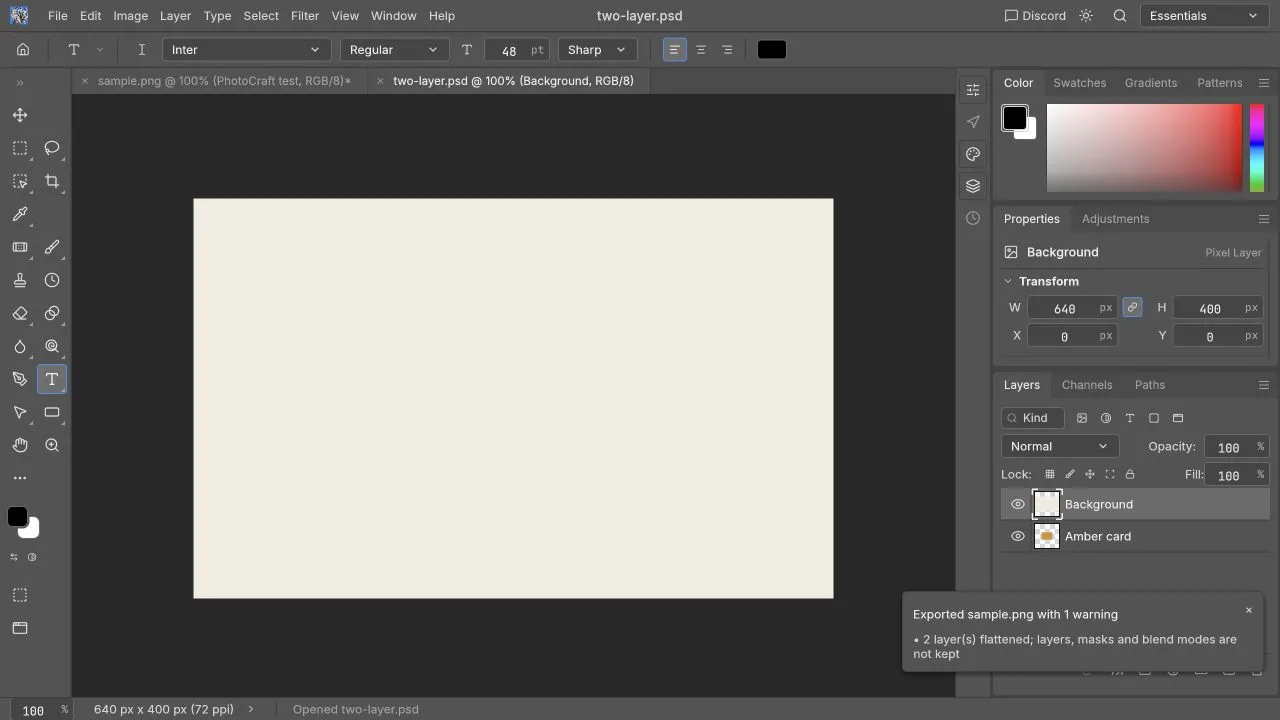
Opening the PSD exposed both named layers, but Background initially covered Amber card, unlike the embedded composite. We have not determined whether the fixture encoding or importer caused that ordering difference. Treat this as a documented result of this sample, not a proven cause or a universal PSD bug.
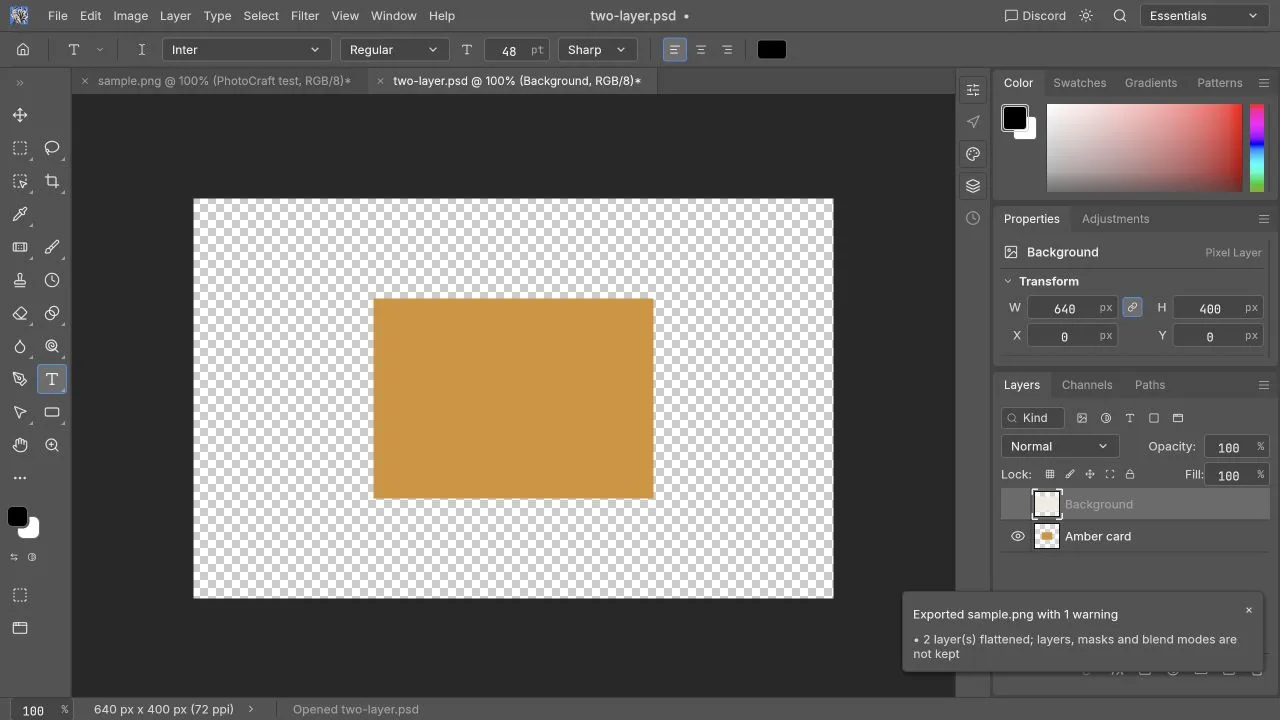
Hiding Background revealed the amber rectangle over transparency. This verifies the visibility control on this imported raster sample.
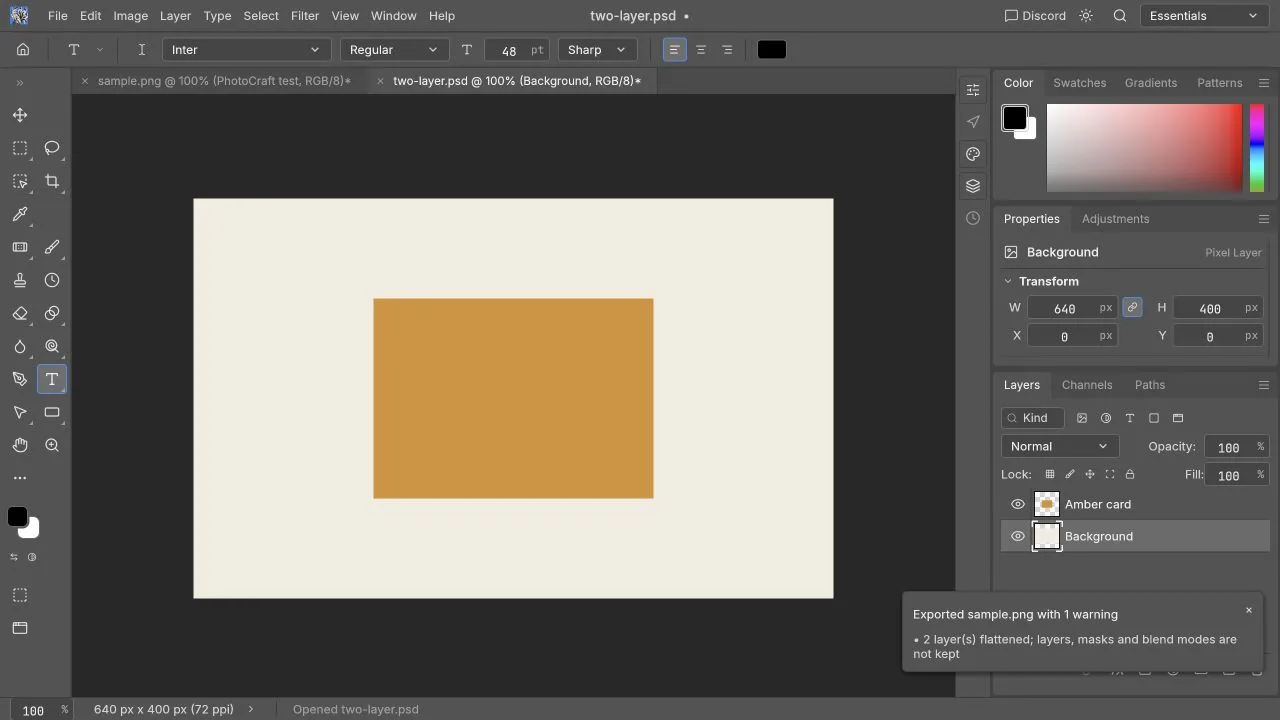
Dragging Background below Amber card produced a composite that visually matched the synthetic PNG. This was checked by sight, not by a pixel-difference tool.
The same session verified PNG opening, new English text, undo/redo, crop, direct brightness adjustment and a downloaded PNG checked at 640 × 400 with the text visible. PSD saving and editable-project reopening were not tested. Neither this sample nor those PNG operations verify imported text, masks, adjustment layers after saving, smart objects, color-managed print work or Photoshop acceptance.
A safe before-and-after test for your file
Work from a copy with a name such as banner-compatibility-test.psd. Ask the file's creator for a flattened reference image and a list of fonts, linked assets and features they expect you to edit. A missing linked file or font is not automatically a PSD decoder defect.
- Record source application/version, dimensions, byte size, color mode, bit depth and layer count. Also record your OS, browser version and PhotoCraft runtime version.
- Open the copy in the editor. Compare at 100% against the reference; inspect text baselines, mask edges, shadows, transparency and color.
- Toggle a raster layer's visibility, then undo. Confirm that the intended layer changes rather than just a merged image.
- Make one small edit to each required feature: change a word, move an object, alter a mask or adjust one filter. Verify visually after each change.
- Download an editable copy separately from the flattened PNG/JPEG delivery image. A flat export deliberately discards layers.
- Reopen both downloads. For a Photoshop handoff, have the recipient open the PSD in their Photoshop version and perform one edit, not just view the composite.
If an operation fails, record it as a limitation for that specific file, version and environment. Do not overwrite the original to “see whether it works.”
What should a published compatibility result contain?
A reproducible record needs more than “PSD passed.” Use a small sample per feature and include the following fields:
| Field | Example of a useful entry |
|---|---|
| Sample | Self-authored RGB 8-bit PSD, dimensions and actual file size |
| Structure | Number and types of layers, masks, text and effects |
| Environment | Exact browser/OS versions and renderer |
| Operation | Change one text string, toggle one layer, save a PSD copy |
| Result | Import, visual comparison, edit, export and reopen assessed separately |
| Limit | Missing font, unsupported filter control or untested receiver |
This article gives you a procedure and a sourced matrix. The checked tiny raster-layer sample cannot verify text, smart filters or professional print delivery, so those features still need their own sample and recipient check.
Can I use PhotoCraft instead of Photoshop for PSD work?
Try it first for non-critical edits where you can inspect the downloaded result and retain a fallback. Complex layouts, unfamiliar smart filters, strict typography and professional color workflows require a file-specific test and recipient approval. For a broader task-based decision, read PhotoCraft versus Photoshop. For operation steps, use edit PSD online; for crashes or import failures, use troubleshooting.